
UI Updates: Account Selector, AML Status & Transactions Table Redesign
1771922658178
Interface Updates & New Features
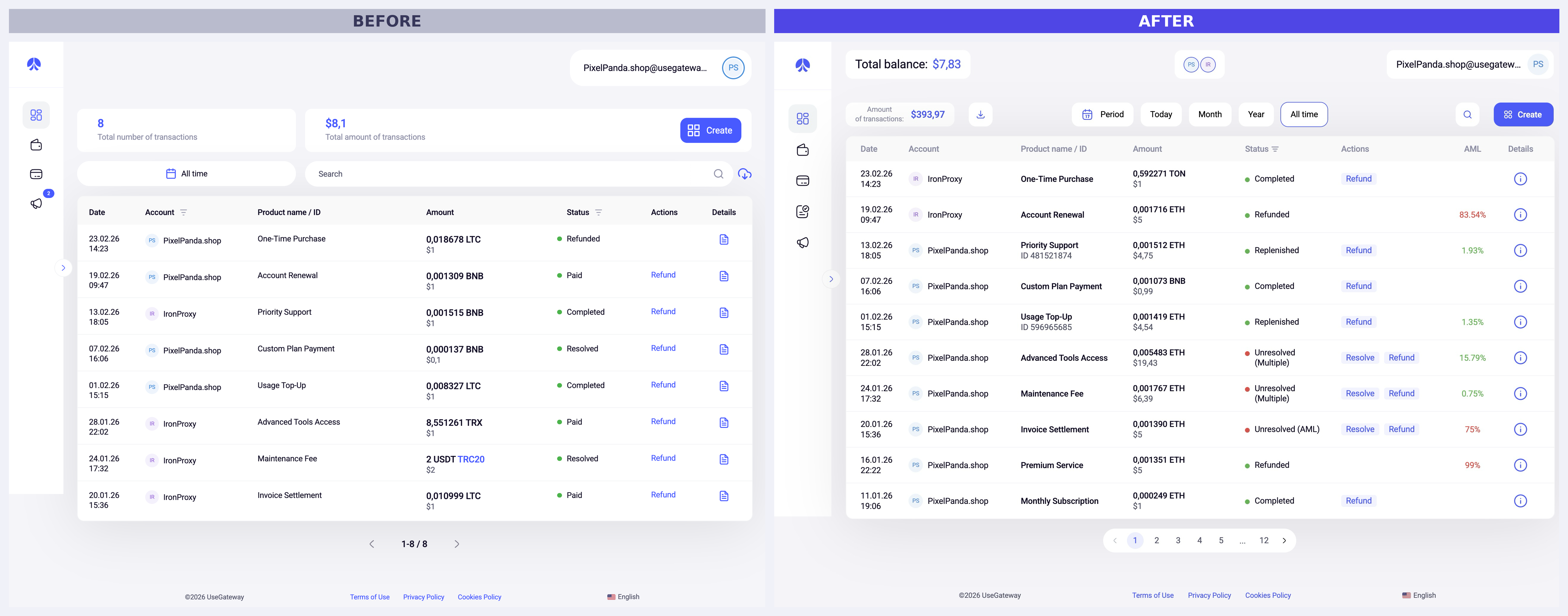
The desktop interface now includes an account selector in the top center that appears when multiple accounts are available. Use it instead of the removed account column filter. On the Dashboard page, it filters transaction tables and amount calculations, including total balance. On all other pages, it acts as an account switcher and syncs with the personal account menu.
Total Balance now appears directly in the page header, giving you instant visibility into your account balance.
The transaction stats area has been streamlined. Instead of two separate stat cards, the total transaction amount now appears inline next to the filter controls, keeping the interface compact.
The period filter has been redesigned with quick-access buttons: Today / Month / Year / All time, making it faster to switch between time ranges.
A new AML column has been added to the transactions table, showing the AML risk score (%) for each transaction at a glance—no need to open transaction details.
The table uses adaptive element display. Cryptocurrency and network information automatically adjusts to fit the available space, with network details moving to a new line when necessary.
Pagination now uses numbered page buttons, making it easier to navigate large transaction lists.
Fixed Issues
Wallet Currency Display: Fixed an issue where the currency icon in the Wallets section didn't match the local currency and showed the dollar sign.
Mobile Transaction Display: Fixed an issue where switching between pagination pages multiple times on mobile devices would cause the vertical scroll to disappear and display only 4 transactions instead of the full list. The transaction list now maintains proper scrolling functionality and displays all transactions correctly when navigating through pagination on mobile devices.
Sidebar Logo: Centered the logo in the sidebar for improved visual alignment.